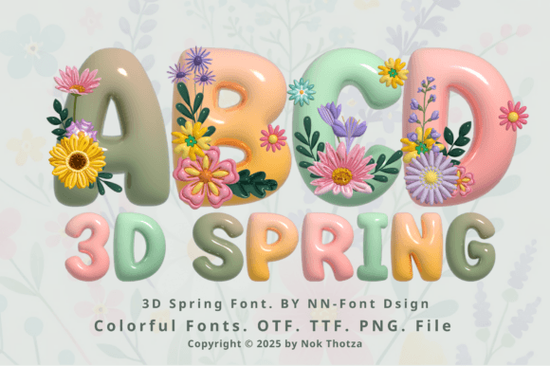
If you're working on spring-themed designs whether for greeting cards, seasonal branding, or printable wall art you’ve probably been looking for a font that captures the lightness and joy of the season. The 3D Spring Font does exactly that. With its soft pastel tones, dimensional letterforms, and subtle floral accents, it brings a cheerful, handcrafted feel to any project without overwhelming your layout.
This font is especially handy if you’re creating content for holidays like Easter, Mother’s Day, or spring festivals. But before you dive in, it’s important to understand how the two versions work because they’re not interchangeable across all design platforms.
Which version should you use: color or black?
The 3D Spring Font comes in two distinct formats:
- Color version: Features full pastel hues and floral details. Works beautifully in design software like Adobe Photoshop, Illustrator, Silhouette Studio, and Inkscape. However, this version uses layered or SVG-based formatting, so it won’t work in Cricut Design Space or other cutting machine software.
- Black (outline) version: A simplified, single-color version that’s fully compatible with Cricut, Silhouette, and similar cutting machines. It keeps the 3D shape but strips away the color layers, making it ideal for vinyl cutting, heat transfer projects, or laser engraving.
If you're unsure which one you need, ask yourself: Will I be cutting this design or just printing it? For print-only projects like posters, invitations, or digital downloads the color version adds instant charm. For physical crafts involving cutting machines, stick with the black version.
How does it compare to other playful fonts?
If you enjoy whimsical typefaces with personality, you might also like the Groovy Daisy Font, which blends retro curves with botanical flair. Or check out the Soccer Football Army Font if you're mixing seasonal themes with sporty or bold aesthetics. Each of these fonts serves a different mood, but they all share that hand-finished, eye-catching quality that makes designs feel personal and lively.
Unlike generic script or sans-serif fonts, the 3D Spring Font stands out because it’s both decorative and readable at medium to large sizes. That balance is rare many ornamental fonts become illegible when scaled down, but this one holds up well for headlines, banners, and product labels.
What kinds of projects work best with this font?
Thanks to its cheerful aesthetic and flexible format options, the 3D Spring Font shines in a variety of creative contexts:
- Greeting cards and invitations – Pair it with watercolor backgrounds or kraft paper textures for an organic spring look.
- Print-on-demand products – Use it on mugs, tote bags, or throw pillows featuring phrases like “Hello Spring” or “Bloom Where You’re Planted.”
- Classroom decor – Teachers can create seasonal bulletin boards or name tags with a soft, inviting vibe.
- Small business branding – Flower shops, bakeries, or garden centers can use it in limited-run packaging or social media graphics to signal freshness and renewal.
Just remember: if you’re designing for commercial resale (like POD items), always confirm the license included with your purchase covers your intended use. Creative Fabrica typically offers commercial licenses with most fonts, but it’s worth double-checking.
Tips for using the color version correctly
Because the color version relies on advanced font technology (like OpenType SVG or multi-layered OTF), it won’t display properly in basic text editors or older software. Stick to programs that support these formats:
- Adobe Photoshop (CC 2017 or newer)
- Adobe Illustrator (CC 2018 or newer)
- Silhouette Studio (Business Edition or higher)
- Inkscape (with SVG font support enabled)
If your letters appear as flat black outlines instead of pastel 3D shapes, you’re likely using an incompatible program. In that case, either switch software or use the black version for cutting and add color manually in your design file.
For a deeper dive into how these fonts work and troubleshooting tips Creative Fabrica’s Ultimate Font Guide walks you through installation, compatibility, and layer management step by step.
Before you start your next spring project, double-check this list:
- ✅ Decide whether you need the color version (for print/digital) or black version (for cutting machines).
- ✅ Confirm your design software supports layered or SVG fonts if using the color version.
- ✅ Test your text at the final output size to ensure readability.
- ✅ Pair the font with simple, clean supporting typefaces to avoid visual clutter.
- ✅ Review your license terms if selling finished products commercially.
With the right setup, the 3D Spring Font can add a burst of seasonal warmth to your creations without requiring hours of custom illustration. Just pick the right version, use it in context, and let those floral details do the talking.
Learn More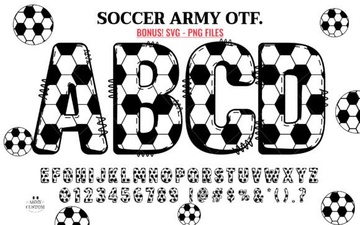 Free Soccer Fonts for Design & Fan Projects
 Western Fonts: Design Tips & Creative Project Ideas
 Designing with a College Distressed Font Style
 Monogram Fonts for Your Wedding Day Style
 Creative Holi Fonts for Festive Design Projects
 Magic Seventie Font: Creative Design Project Ideas